
Handcrafted emoji
In JavaScript, strings can contain emoji. You’ll quickly notice, however, that they don’t behave quite like the ASCII characters you come across in most strings.
export const emojiExample = [
"😶🌫️".length,
"😶🌫️"[0],
];
Output:
[
  6,
  "\ud83d"
]
That’s because these “characters” are not characters at all but “graphemes” which consist of many individual code points.
Let’s learn how to inspect these “code points” and learn how to build emoji with them.
🔗 String.prototype.codePointAt()
Similar to String.prototype.charCodeAt(), codePointAt gets us the unicode code point at the given index.
export const codePointAtExample = [
"H".charCodeAt(0),
"😶🌫️".codePointAt(0),
"😶🌫️".codePointAt(0).toString(16),
];
Output:
[
  72,
  128566,
  "1f636"
]
When investigating the different code points of a given character, manually entering codePointAt(0), codePointAt(1), etc. is unnecessary. Instead we can use JavaScript spread syntax, which automatically splits unicode characters into their constituent code points.
With spread, we can see how  is actually a combination of four code points.
is actually a combination of four code points.
export const spreadExample = [
[..."😶🌫️"],
[..."😶🌫️"]
.map((c) =>
c.codePointAt(0).toString(16),
)
.join(" "),
];
Output:
[
[
"😶",
"",
"🌫",
"️"
],
"1f636 200d 1f32b fe0f"
]🔗 String.fromCodePoint()
Instead of splitting into code points, we can build a string from code points.
export const fromCodePointExample = [
  String.fromCodePoint(128566),
  String.fromCodePoint(0x1f636),
  String.fromCodePoint(
    0x1f636,
    0x200d,
    0x1f32b,
    0xfe0f,
  ),
];
Output:
[
"😶",
"😶",
"😶🌫️"
]🔗 Flags
A funny thing happens when we put spread syntax over a flag such as  .
.
.
export const jpFlag = [..."🇯🇵"];
Output:
[
  "🇯",
  "🇵"
]
We get two components, 🇯 and 🇵. A pattern emerges when we try this with the Armenia flag  .
.
.
export const amFlag = [..."🇦🇲"];
Output:
[
  "🇦",
  "🇲"
]
To build our own flags, it might be helpful to convert A to 🇦 and P to 🇵. These fancy boxed letters can be found in the unicode Enclosed Alphanumeric Supplement.
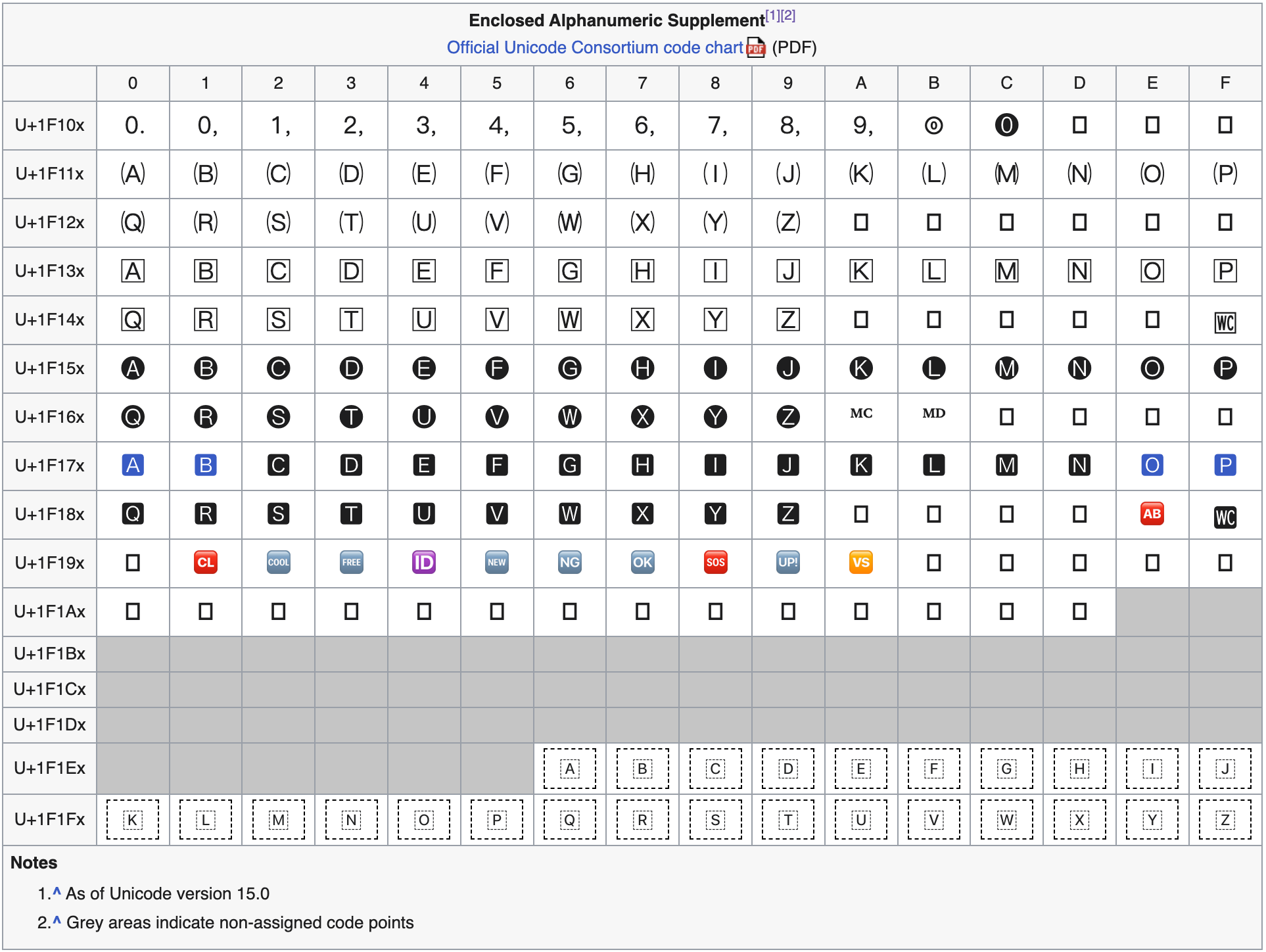
Here we see that our fancy A begins at 0x1F1E6.
// 🇦
export const regionalIndicatorA =
  0x1f1e6;
Then we can simply determine how far away a character like “P” is from “A” (using the difference in its String.prototype.charCodeAt) and add it to this 0x1F1E6 offset.
const { regionalIndicatorA } =
  await import(
    "https://esm.town/v/jdan/" +
      "regionalIndicatorA"
  );
export const regionalIndicatorOfLetter =
  (char) => {
    if (char.length !== 1) {
      throw new Error(
        "Must be a single character",
      );
    }
    if (char < "A" || char > "Z") {
      throw new Error("Must be A-Z");
    }
    return (
      char.charCodeAt(0) -
      "A".charCodeAt(0) +
      regionalIndicatorA
    );
  };
Now, we’re ready to build our own emoji.
const { regionalIndicatorOfLetter } =
  await import(
    "https://esm.town/v/jdan/" +
      "regionalIndicatorOfLetter"
  );
export const handCraftedArmenianFlag =
  String.fromCodePoint(
    regionalIndicatorOfLetter("A"),
    regionalIndicatorOfLetter("M"),
  );
Output:
"🇦🇲"
Exercise for the reader: Print a “hand-crafted” flag for every two-letter combination. ([A-Z, A-Z] gives 676 possibilities). How many do your computer display as a single grapheme?
🔗 Regional flags
As part of Unicode 10.0, alongside  and
and  , we received three “regional” flags for three countries in the United Kingdom.
and , we received three “regional” flags for three countries in the United Kingdom.
Upon close inspection, these flags are not built from regional indicators like 🇦, but from something else entirely.
export const welshFlag = [..."🏴"];const { welshFlag } = await import(
"https://esm.town/v/jdan/" +
"welshFlag"
);
export const welshFlagCodePoints =
welshFlag.map((c) =>
c.codePointAt(0).toString(16),
);
Output:
[
  "1f3f4",
  "e0067",
  "e0062",
  "e0077",
  "e006c",
  "e0073",
  "e007f"
]
The first code point is simply: WAVING BLACK FLAG or  . On platforms/apps which do not yet support these regional emoji, you may notice they display as . Even popular JavaScript libraries struggle with this!
. On platforms/apps which do not yet support these regional emoji, you may notice they display as . Even popular JavaScript libraries struggle with this!
export const toArrayExample =
  (async () => {
    const { default: _ } =
      await import("npm:lodash");
    return [
      _.toArray("hi 🇺🇸")
        .join(", "),
      _.toArray("hi 🏴")
        .join(", "),
    ];
  })();
The last code point: 0xE007F is known as CANCEL TAG. It does not render by itself, but is commonly displayed as ✦ for documentation purposes.
So what about the five code points in the middle? What do they correspond to? Keen eyes will notice that the hex codes 67, 77, and even 6c look quite… familiar.
const { welshFlagCodePoints } =
  await import(
    "https://esm.town/v/jdan/" +
      "welshFlagCodePoints"
  );
export const welshInnerCodePoints =
  welshFlagCodePoints
    .slice(1, -1)
    .map((c) => {
      const codepoint = parseInt(c, 16);
      return String.fromCharCode(
        codepoint - 0xe0000,
      );
    });
Output:
[
  "g",
  "b",
  "w",
  "l",
  "s"
]
By subtracting 0xE0000 we get an ascii character. In this case, we see the Wales flag is built from a waving black flag, the characters “gbwls” mapped to TAG LATIN SMALL letters, and ending with a CANCEL TAG ✦.
Now, we’re ready to build our own Flag: Wales emoji.
const { cancelTag } = await import(
  "https://esm.town/v/jdan/" +
    "cancelTag"
);
const { wavingBlackFlag } =
  await import(
    "https://esm.town/v/jdan/" +
      "wavingBlackFlag"
  );
export const handCraftedFlagWales =
  String.fromCodePoint(
    wavingBlackFlag,
    "g".charCodeAt(0) + 0xe0000,
    "b".charCodeAt(0) + 0xe0000,
    "w".charCodeAt(0) + 0xe0000,
    "l".charCodeAt(0) + 0xe0000,
    "s".charCodeAt(0) + 0xe0000,
    cancelTag,
  );
Output:
"🏴"
Exercise for the reader: Hand-craft the other two regional flags: Scotland and England.